Step 3 of 6
Review the take
Watch the new take and compare it with the highlighted shot in the script. Press play, then step through the Generation History. Star the take your cut should use.
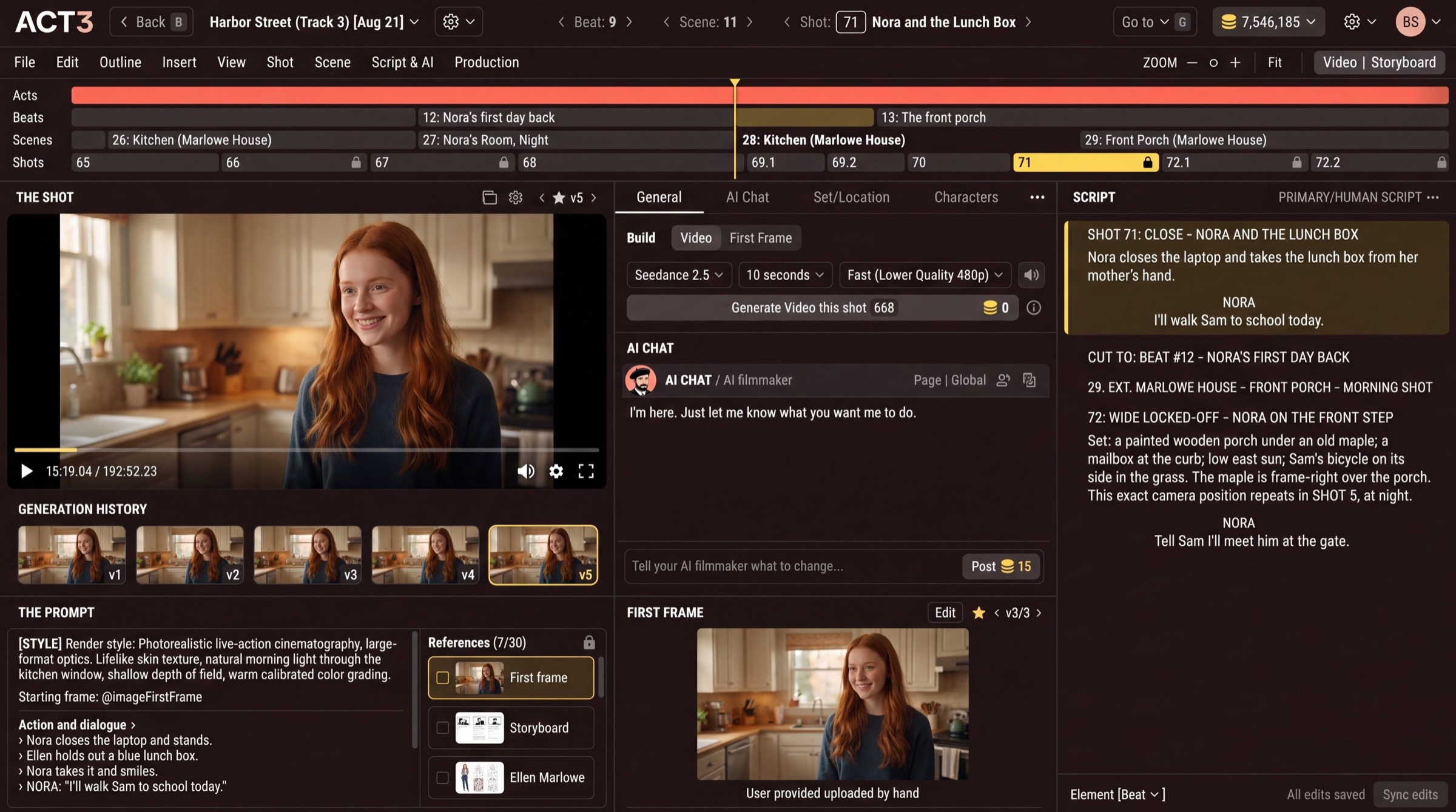
What you are judging
Watch the take in THE SHOT and read the highlighted block in the SCRIPT beside it. Ask what a director of photography would ask: is the framing what the shot calls for, does the light match the scene, does the action happen in the right order, does the actor look like the same person as in the last shot?
- GENERATION HISTORY shows every take of this shot (v1, v2...). Click one to watch it.
- The ‹ ★ v5 › stepper over the player steps through takes. The filled star marks the take your film uses.
- The AI filmmaker often points out a mismatch with the script in the chat before you spot it.
Your decision: keep it, or change something
Keep it: star the take and move to the next shot (step 6). The picture is wrong but the story is right: fix the first frame or the prompt and build again. The story itself should change (a line, a set, an actor's action): ask the AI chat, the next step.
Why you go next to the AI chat
Most fixes are faster to say than to type into a prompt. The AI filmmaker changes the script and the shot's prompt together, so they stay in step.